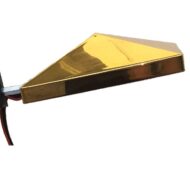
Setting Up The Ajna Light
- On the Ajna Lamp Pyramid, attach the 1/4 inch mount connector your tripod
- Plug in the headphone & WiFi adapter to the usb slots located on the Ajna Light PC Box
- Connect the power supply to your outlet and wait a few minutes for the PC to boot up the WiFi signal
- Connect to the AjnaLamp–XXXXXX WiFi acesss point with your choice of device, enter the password pineal777
- Open any web browser on your smartphone, tablet or laptop (Chrome, Safari, Firefox) and type in the address bar: al.com, or any URL (aaa.com light3.com etc)
There is no need to have internet access to use the Ajna Light, it creates it’s own WiFi network (called a WiFi hotspot). It is also possible to use an ethernet connection using an ethernet cable and a router port.
Shutting Down Your Light
Make sure the current session is completed or stopped, then touch the red shut down button on the top right hand corner in any of the Ajna Lamp Control pages. Confirm shutdown, then wait until after the countdown is at zero before you unplug your light.
Using the PyraLight Pad and IR Nasal Laser with the Ajna Light
The PyraLight.com pad works very well during an Ajna Light session to relax the body using the three brain wave EEG frequencies of delta, schumann, and gamma. Place the pad on the abdomen before starting the Ajna Light session.
The IR Nasal Light uses two 650nm red lasers which shine inside the nose to increase oxygen in the brain, and mitochondrial energy. This helps clear brain fog and reduces tiredness. The blood capillaries inside of the nostrils are close to the surface and all the blood coming through them receives the IR laser light. This light separates the red blood cells which are typically coagulated in the blood, giving them their full surface area to carry oxygen. In China, most of the recent research on nasal IR light has been done for treatment of stroke and dementia.
The Nasal IR Light is very helpful on its own, or in conjunction with the PyraLight and Ajna Light.